Spring Cloud Config
MSA에서는 각 설정파일(.yml, .properties) 들을 서비스 내부에서 관리하는것이 아니라, Config server를 두어서 설정값을 넘겨줍니다.
이로 인해 여러 서비스에서 하나의 설정파일을 공유할 수도 있고, 혹은 설정 값을 변경할 때 중앙에서 쉽게 관리할 수 있게 됩니다.
뿐만 아니라 dev, prod 환경 등을 구분하여 설정파일을 제공해줄 수 있어서 개발환경과 배포환경을 쉽게 구분하여 구성할 수 있습니다.
Spring Cloud에선 Cloud Config Server를 통해 중앙 서버에서 Config설정을 관리하는 서비스를 만들 수 있습니다.
공식 홈페이지
Cloud Config Server 구성
build.gradle에 Spring cloud 의존성을 추가하고 Application 클래스에 @EnableConfigServer어노테이션을 추가함으로서 Cloud Config Server로 사용할 수 있습니다.
groovy
1 dependencies { 2 implementation 'org.springframework.cloud:spring-cloud-starter' 3 implementation 'org.springframework.cloud:spring-cloud-config-server' 4 }
java
1 @SpringBootApplication 2 @EnableConfigServer 3 public class ConfigServerApplication { 4 public static void main(String[] args) { 5 SpringApplication.run(ConfigServerApplication.class, args); 6 } 7 }
저장소
Config Server에서 yml을 관리할 저장소는 크게 2가지가 있습니다.
첫번째로는 config server의 로컬 파일 시스템을 활용하는 방법과, 두번째로는 다른 git repository를 이용해 그곳으로 부터 가져올 수 있습니다.
로컬 파일 시스템
yml
1 spring: 2 profiles: 3 active: native 4 cloud: 5 config: 6 server: 7 native: 8 search-locations: classpath:configs/
spring.profiles.active 속성을 native로 한다면 설정파일을 외부가 아닌 파일 시스템 혹은 프로젝트 내부 소스에서 제공하겠다는 의미입니다.
spring.cloud.config.server.native.search-locations 속성은 설정파일들을 가져올 위치를 정할 수 있습니다.
classpath를 이용해 현재 서비스의 /src/main/resources/로 부터 설정파일을 가져올 수 있습니다.
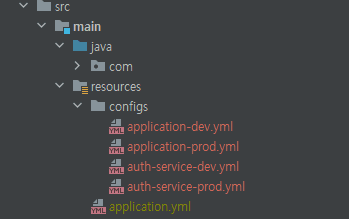
위처럼 configs 폴더로부터 설정파일을 가져오게 됩니다.
Git 저장소
yml
1 server: 2 port: 8881 3 4 spring: 5 cloud: 6 config: 7 server: 8 git: 9 uri: https://github.com/show5116/...git 10 username: test 11 password: test 12 search-paths: configs
git repository를 만들어서 username과 password를 통해 접근하고, 그 repository의 search-paths의 위치로 부터 설정 파일들을 가져올 수 있습니다.
Client에서 사용
각 Client서비스에서는 Cloud Config Server로부터 설정정보를 가져와서 빌드시에 설정파일을 적용해줍니다.
설정파일은 정해진 순서대로 읽게 되고, 같은 속성이 존재할 경우 마지막에 읽는 속성값으로 적용됩니다.
groovy
1 dependencies { 2 implementation 'org.springframework.cloud:spring-cloud-starter-config' 3 }
yml
1 spring: 2 application: 3 name: auth-service 4 cloud: 5 config: 6 uri: http://localhost:8881# config server uri 7 profiles: 8 active: dev,test
yml 파일 명 규칙
저장소로부터 yml파일을 가져오는 요소는 총 3가지가 있습니다.
- {application} spring.application.name에 매핑됩니다.
- {profile} spring.profiles.active에 매핑됩니다. (쉼표로 구분)
- {label} git의 경우 branch로 매핑됩니다.
위의 yml파일과 같이 설정하였을 경우 우선 순위를 가지고 속성이 적용됩니다.
- config server {application}-{profile}.yml
- config server {application}.yml
- config server application-{profile}.yml
- 각 프로젝트 application-{profile}.yml
- config server application.yml
- 각 프로젝트 application.yml
만약 profile이 여러개일 경우 쉼표(,)를 기준으로 앞의 profile을 우선으로 적용합니다.
실제로는 위의 우선순위의 반대로 yml파일을 불러오며, 만약 먼저 불러온 속성과 겹치는 속성이 뒤에 있을 경우 그 값을 덮어 쓰면서 기존의 값은 사라지게 됩니다.
마치며
위의 설정을 이용하여 실제로 dev, prd 환경에 맞게 설정값들을 쉽게 가져올 수 있습니다.
더하여서 config server 자체를 숨기는 방법도 있고, 혹은 git private repository를 이용하여 ssh key를 통해 설정 값을 가져올 수 도 있고 무중단 설정값 변경 등 onfig server의 활용방법은 많습니다.
각 어플리케이션마다 특징이나 환경이 다르니 공식 문서를 참조하면서 알맞게 적용하는 것이 좋을 수 있습니다.